Track your nutrition and health goals

Hint Maintenance Calories Calculator | Clearcals
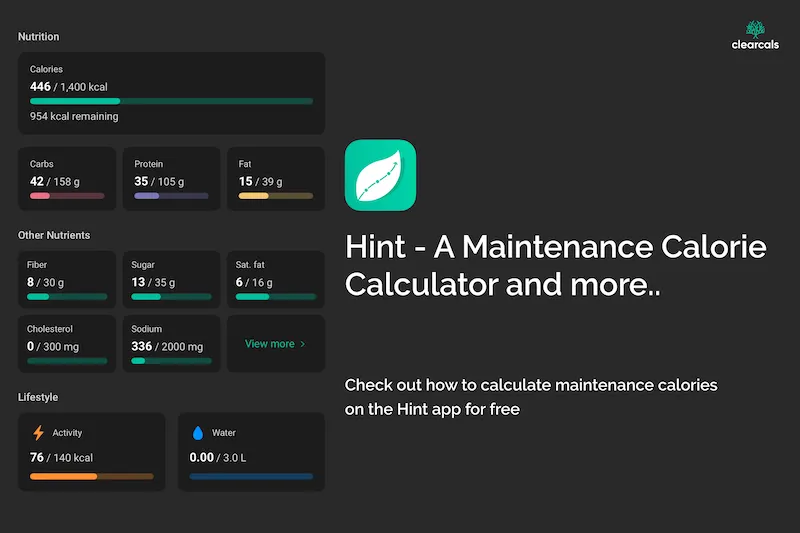
Hint Maintenance Calories Calculator: How It Works and How to Use It (2026)
By Dr. Krishna Athmakuri, Co-Founder & CEO, Clearcals | Updated: August, 2026
TL;DR
- Maintenance calories are the number that keeps your weight stable — eat more, and you gain; eat less, and you lose
- The Harris-Benedict equation estimates it manually from your age, weight, height, gender, and activity level
- The Hint app calculates this automatically from your profile — no manual math needed — and shows it on your home screen, free on every plan
- To lose or gain weight, set a target weight and Hint's Easy/Moderate/Fast pace picker turns your maintenance number into a specific calorie goal, weekly rate, and estimated timeline
- Recalculate every 5–10 kg lost or gained, since your maintenance number changes as your body does
Table of Contents
- What Are Maintenance Calories?
- What Happens Above or Below Maintenance
- Calculating Maintenance Calories Manually
- Getting Your Maintenance Calories on Hint
- Turning Maintenance Calories Into a Weight Goal
- When to Recalculate
- FAQs
What Are Maintenance Calories?
Maintenance calories — also called maintenance energy intake — are the number of calories your body needs each day to keep your current weight stable. This covers everything your body spends energy on: basic metabolic functions (breathing, circulation, cell repair), physical activity, and digestion itself. Eat roughly this amount consistently, and your weight holds steady over time.
What Happens Above or Below Maintenance
Eat more than maintenance, consistently, and you gain weight — the surplus energy gets stored, mostly as fat.
Eat less than maintenance, consistently, and you lose weight — your body draws on stored fat to cover the gap.
Eat close to maintenance, and your weight stays roughly where it is. This is why maintenance calories are the reference point for any goal — you can't set a meaningful deficit or surplus without first knowing the number you're adjusting from.
Calculating Maintenance Calories Manually
Maintenance calories depend on age, gender, weight, height, activity level, and metabolic rate, which makes them genuinely complex to work out by hand. One commonly used method is the Harris-Benedict Equation:
For men: BMR = 88.362 + (13.397 × weight in kg) + (4.799 × height in cm) − (5.677 × age in years) Maintenance calories = BMR × Activity Factor
For women: BMR = 447.593 + (9.247 × weight in kg) + (3.098 × height in cm) − (4.330 × age in years) Maintenance calories = BMR × Activity Factor
The Activity Factor adjusts BMR for how much you move:
- Sedentary (little or no exercise): BMR × 1.2
- Lightly active (light exercise 1–3 days/week): BMR × 1.375
- Moderately active (moderate exercise 3–5 days/week): BMR × 1.55
- Very active (hard exercise 6–7 days/week): BMR × 1.725
- Super active (very hard exercise, physically demanding job): BMR × 1.9
These equations give a solid estimate, but they're still an estimate — individual metabolic variation means the real number can be somewhat higher or lower than what the formula predicts.
If you'd rather not run the numbers by hand, Clearcals' free TDEE Calculator does it for you — enter your gender, age, weight, height, and activity level, and it returns your maintenance calories instantly using the Mifflin-St Jeor equation, a widely used alternative to Harris-Benedict. No download or sign-up required, so it's a quick way to check your number before committing to the app.
Getting Your Maintenance Calories on Hint
If you'd rather skip the manual math, the Hint app calculates your maintenance calories automatically:
- Download the app from the Google Play Store or Apple App Store
- Build your profile — age, gender, weight, height, and activity level
- Hint calculates your maintenance number from these details and displays it on your home screen as your daily calorie target
This is free on every plan, no subscription required — it's the baseline number the rest of the app builds on, including your free AI insights after each meal.
Turning Maintenance Calories Into a Weight Goal
Knowing your maintenance number is the starting point — the next step is deciding how far above or below it to eat, depending on your goal.
For weight loss: set your target weight in the app (during onboarding or anytime from your profile), and Hint shows three preset paces — Easy, Moderate, and Fast — each with its own calorie goal below maintenance, an estimated weekly rate of loss, and how many months it should take to reach your target. Moderate is recommended by default, since it typically lands in the 10–20%-below-maintenance range that's sustainable without excessive hunger. Avoid dropping your target more than 25% below maintenance — overly aggressive deficits raise the risk of nutrient deficiency and rebound eating. See our full guide to setting realistic calorie goals for how the pace picker works in detail.
For weight gain: the same logic applies in reverse — a moderate surplus above maintenance (roughly 300–500 kcal/day) supports steady, healthy gain without excessive fat gain.
For a done-for-you plan instead of adjusting the number yourself: Hint Pro generates a full diet plan — specific meal suggestions built around your calorie target — rather than leaving you to hit the number on your own.
When to Recalculate
Your maintenance calories aren't fixed forever. Recalculate when:
- You've lost or gained 5–10 kg — a lighter or heavier body needs a different number of calories to maintain itself
- Your activity level changes — a new gym routine, a desk job, or a more active season of life
- You hit a genuine plateau — 2–3 weeks of no movement with accurate, consistent logging is a signal to check whether your maintenance estimate (and therefore your deficit or surplus) still holds
Frequently Asked Questions
What are maintenance calories? The number of calories your body needs each day to keep your current weight stable — the reference point for any weight loss or gain target.
How do I calculate maintenance calories without doing the math myself? Enter your age, gender, weight, height, and activity level in the Hint app, and it calculates your maintenance calories automatically, shown on your home screen.
How much should I eat to lose weight? A deficit of 10–20% below maintenance (roughly 200–400 kcal/day on a 2,000 kcal baseline) is a sustainable, commonly recommended range. Hint's Moderate pace is calibrated close to this by default.
Can I edit my calorie goal in Hint? Yes — set a target weight and choose a pace (Easy, Moderate, or Fast); Hint recalculates your calorie goal, weekly rate, and estimated timeline accordingly. You can change your pace anytime.
Is the maintenance calorie calculator free? Yes — it's calculated automatically from your profile on the free tier, no subscription required.
Is this available on both iOS and Android? Yes, as of the current version of the app.
Read Next
- Try the Free TDEE Calculator →
- Setting Realistic Calorie Goals for Weight Loss with Hint →
- Understanding Calories: How to Track and Manage Your Intake →
- How Hint's Free AI Insights Work →
- Hint Pro →
- Calorie Tracking Guide for Indians →
About the Author
Dr. Krishna Athmakuri is the Co-Founder and CEO of Clearcals, where he leads the development of data-driven health technology for India. With a Ph.D. in Chemical Engineering from Rensselaer Polytechnic Institute, New York, his expertise spans protein analytics, bioprocess engineering, and health data systems. At Clearcals, he applies that scientific rigour to build personalised fitness tools — including the Hint app — grounded in Indian nutritional science and clinical evidence.
Connect with Dr. Krishna on LinkedIn