Track your nutrition and health goals

Custom Recipes on Hint: Build or Clone Any Recipe | Clearcals
By Dr. Krishna Athmakuri, Co-Founder & CEO, Clearcals | Updated: August, 2026
TL;DR
- Hint lets you build a nutrition label for any home-cooked recipe from scratch, ingredient by ingredient
- You can also clone/edit any existing item already in Hint's database if it doesn't match how you actually cook it
- Recipes live under the Recipes tab, alongside General and Favourites, in a dedicated "My Recipes" list — saved once, logged in one tap from then on
- The builder also handles packaged items that aren't home-cooked at all, like a protein powder or supplement, and lets you tag a recipe by meal type and cuisine for easier reuse
- As of August 2026, users have created over 4,000 custom recipes on Hint — a real sign people are personalising their tracking rather than settling for generic entries
- This is the single biggest accuracy fix for Indian home cooking, where oil, ghee, and portion size vary meal to meal
Table of Contents
- Why Generic Database Entries Fall Short
- Building a Recipe From Scratch
- Cloning and Editing an Existing Entry
- Where Your Recipes Live
- What You Get in the Nutrition Label
- Adopted at Scale
- FAQs
Why Generic Database Entries Fall Short
Search "dal" or "aloo sabzi" in almost any calorie app, and you'll get one generic entry standing in for a dish that's actually cooked a dozen different ways across a dozen different kitchens. The amount of ghee in the tempering, how much oil the sabzi was cooked in, whether it's a thin dal with water or a thick one — none of that is captured by a single database entry, and the gap between the generic number and your actual meal can be substantial.
Hint solves this two ways: build a recipe from scratch, or clone and adjust one that's already in the database.
Building a Recipe From Scratch
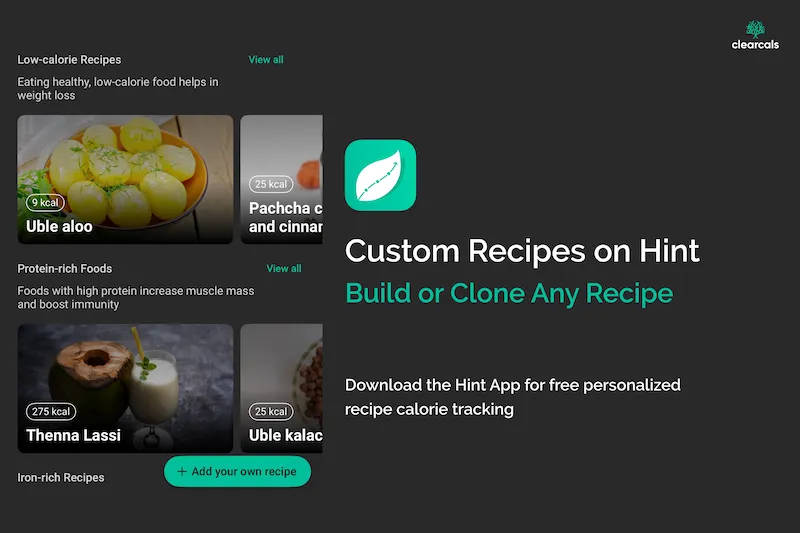
From the Recipes tab, tap Add your own recipe to open the Create Recipe form:
- Name your recipe (required) — e.g., "Amma's Aloo Gobi" or "Sunday Dal Tadka"
- Add a description (optional) — useful if you're logging variations of the same dish
- Set the serving unit and serving size (required) — grams by default, adjustable to match how you actually measure the dish
- Add your ingredients (required) — tap the "+" to add each one with its quantity; Hint calculates the nutrition label from these automatically
- Add instructions (optional) — step-by-step notes if you want to save the method alongside the macros
- Tag meal type and cuisine (optional) — meal types include Breakfast, Lunch, Dinner, Early Morning, Morning/Afternoon/Evening Snack, Bedtime, Pre-Workout, and Post-Workout; cuisines cover Indian regional categories (North Indian, South Indian, Andhra, Telangana, Rayala Seema, Tamil Nadu, Kerala, Karnataka, Goan, Maharashtra, Haryana, Himachal, Punjabi, and more), plus a Diets field
- Save Recipe — Hint generates the full nutrition label instantly, calculated from the NIN-ICMR Indian Food Composition Table
Once saved, the recipe lives in your personal library and logs in one tap for every future meal — no need to rebuild it each time. This isn't limited to home-cooked dishes either — it works just as well for a packaged item like a protein powder or supplement that isn't in the general database, logged with its actual serving size and macros.
Cloning and Editing an Existing Entry
If a dish already exists in Hint's database but the standard entry doesn't match how you cook it — more oil, less ghee, a different vegetable mix — you don't need to start from scratch:
- Open the dish's detail page from the General database (e.g., "Cauliflower peas curry")
- Tap the ••• (three-dot) icon in the top-right corner
- Tap Clone Recipe
- Adjust the ingredients and quantities to match how you actually cook it, then save — your version goes into My Recipes, alongside anything you've built from scratch
This matters for anyone who's found an "aloo gobi" or "dal" entry in the past that was close but not quite right — instead of accepting the inaccuracy or building a duplicate from zero, you clone the existing entry and adjust it once.
Where Your Recipes Live
The Recipes tab in the bottom navigation (alongside Home, Plans, Insights, and More) has three sub-tabs: General (Hint's built-in database), Favourites, and My Recipes — where every recipe you've built or cloned is saved. Each entry in My Recipes shows its serving size and calorie count at a glance, so you can find and log a saved recipe in seconds without re-entering anything.
What You Get in the Nutrition Label
Every custom or cloned recipe generates a full breakdown, not just a calorie count:
- Calories, shown alongside a carbs/protein/fat ratio chart
- Carbohydrates (broken down further into fibre and sugar), protein, and fat, in grams
- Micronutrients tracked against Indian RDAs (NIN-ICMR 2020), as part of Hint's 31-nutrient tracking
This is the same level of detail as any built-in database entry — the difference is it's calculated from your actual ingredients and portions, not an average. General database entries also carry a short description of the dish's nutritional highlights (for example, noting it's a good source of fibre or relevant for managing diabetes) — when you clone one of these, that context comes along with it.
Adopted at Scale
Every recipe a user builds, or clones, is tracked internally before it's reviewed and, where relevant, folded into the general database — as of August 2026, that queue holds over 4,000 user-created recipes. That's a meaningful signal: people aren't just tolerating generic entries; they're actively building recipes that match how they actually eat.
Frequently Asked Questions
Can I create my own recipes on Hint? Yes — build a recipe from scratch by naming it, setting servings, and adding ingredients and quantities. Hint generates the nutrition label automatically.
Can I edit a recipe that's already in Hint's database? Yes — if an existing entry doesn't match your actual recipe, you can edit its ingredients or macros directly and save your version. It replaces the standard entry for future logs of that dish.
Do I need to rebuild my recipe every time I cook it? No — once saved, a custom or edited recipe logs in one tap for every future meal.
Is this feature free? Yes — the custom recipe builder and the ability to edit existing entries are both available on the free tier, no subscription required.
Does this work for regional or family recipes not in the database at all? Yes — building from scratch is designed exactly for dishes that don't have a standard entry, including specific family recipes and regional variations. Meal-type and cuisine tags (Andhra, South Indian, Punjabi, and others) make these easy to find again later.
Can I use this for packaged foods or supplements, not just home-cooked meals? Yes — the same builder works for anything not already in the general database, such as a specific protein powder or supplement, logged with its actual serving size and macros from the label.
Where do my saved recipes show up? Under the Recipes tab, in the "My Recipes" sub-tab alongside "General" (Hint's database) and "Favourites."
Read Next
- How Hint's Free AI Insights Work →
- Hint – An Indian Food Calorie Calculator & More →
- How Accurate Are AI Calorie Tracking Apps? →
- Calorie Tracking Guide for Indians →
About the Author
Dr. Krishna Athmakuri is the Co-Founder and CEO of Clearcals, where he leads the development of data-driven health technology for India. With a Ph.D. in Chemical Engineering from Rensselaer Polytechnic Institute, New York, his expertise spans protein analytics, bioprocess engineering, and health data systems. At Clearcals, he applies that scientific rigour to build personalised fitness tools — including the Hint app — grounded in Indian nutritional science and clinical evidence.
Connect with Dr. Krishna on LinkedIn