Track your nutrition and health goals

How Hint's Free AI Insights Work | Clearcals
By Dr. Krishna Athmakuri, Co-Founder & CEO, Clearcals | Updated: August, 2026
TL;DR
- After every meal you log, Hint generates a short AI insight tied to your specific goal — weight loss, muscle gain, or managing a condition like diabetes, PCOS, or high cholesterol
- Insights aren't limited to food — once workouts and sleep sync in via Apple Health or Google Health Connect, Hint generates personalised insights on those too
- Insights are free for every user on every plan, no subscription required
- They go beyond the calorie number — flagging protein/fibre gaps, excess refined carbs, sodium, or cooking fat, and suggesting one concrete fix
- Hint Pro and Hint Premium add weekly/monthly pattern insights and trend charts on top of the free per-meal, per-workout, and per-sleep insights
Table of Contents
- What a Hint AI Insight Actually Says
- How It's Different From a Generic Calorie Number
- Workout & Sleep Insights
- Insights by Goal
- Free vs Pro/Premium — What Changes
- How to Get the Most Out of It
- FAQs
What a Hint AI Insight Actually Says
Log a meal in Hint, and instead of just a calorie total, you get a short, specific note — one or more of the following:
- A simple swap or portion adjustment to improve the meal's balance
- Whether you're falling short on protein or fibre for the day
- What to reduce — excess refined carbs, added sugar, or cooking fat — without being prescriptive about it
- One small habit you can apply next time this dish comes up
It's designed to be a nudge, not a lecture — one thing to act on, not a wall of nutrition advice.
How It's Different From a Generic Calorie Number
Most calorie trackers stop at "here's how many calories that meal had." Hint's insight goes one step further and asks: is this meal actually helping you toward your goal? A 600-calorie meal that's protein-light isn't the same as a 600-calorie meal that hits your protein target — the number alone doesn't tell you that, but the insight does.
This matters more for Indian home cooking specifically, where the biggest blind spot isn't the dish itself but what's mixed into it — a spoon of ghee in the tempering, extra oil in a sabzi. Because Hint's insights are generated from a verified recipe and portion, not a rough visual guess, they can flag these specifics accurately. See our full breakdown of how AI calorie-tracking accuracy varies by app →
Workout & Sleep Insights
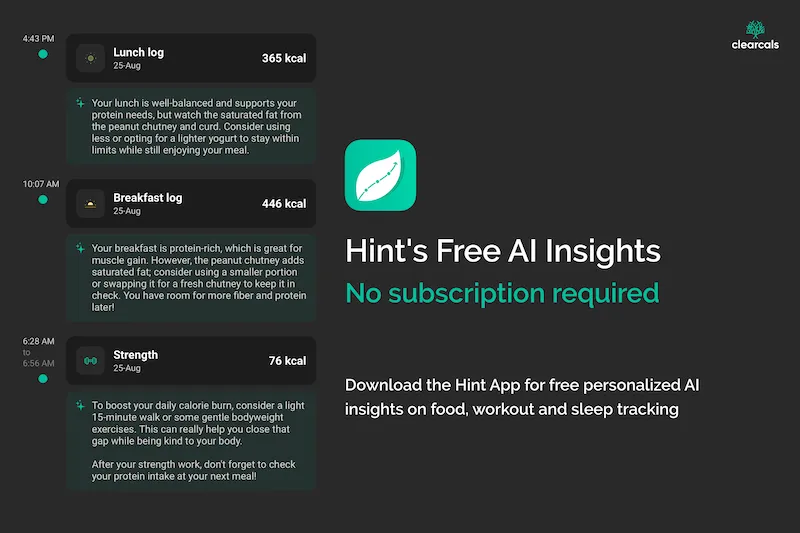
AI insights aren't limited to what you eat. Once your workouts and sleep sync into Hint — automatically via Apple Health on iOS, or Google Health Connect on Android — Hint generates a personalised insight for those too, the same way it does for meals.
A logged walk might get a note like: "Fantastic job today! With your walking sessions, you've not only hit your activity target but exceeded it, contributing positively to your weight loss journey. Don't forget to hydrate after your cardio!" A sleep entry might read: "Your efficient sleep supports your muscle recovery, crucial for your goals. Consider a calming wind-down routine to help ease into rest more smoothly."
Like the meal insights, these are tied to your specific goal — an activity insight for someone training for muscle gain reads differently than one for someone focused on weight loss, and a sleep insight factors in how recovery connects to whichever goal you've set.
Insights by Goal
Every insight — meal, workout, or sleep — is generated against the specific profile you set up in Hint: your goal (weight loss, muscle gain, calorie tracking, following a diet plan, or working with a dietitian), any health conditions you've flagged, and your food preference. Health conditions Hint personalises around include diabetes, prediabetes, high blood pressure, high cholesterol, high triglycerides, hypothyroidism, gluten sensitivity, anemia, and PCOS.
Weight loss: Flags where excess calories are actually coming from — usually cooking fat, refined carbs, or portion size rather than the foods themselves.
Muscle gain: Surfaces your protein gap for the day so you know whether your next meal (or your recovery) needs to close it.
Diabetes/prediabetes: Highlights carbohydrate load relative to your targets for that meal.
High cholesterol / high triglycerides: Flags saturated fat and cholesterol intake against your targets, alongside the usual calorie and macro numbers.
PCOS: Flags refined carbohydrate intake and protein balance, the two levers most commonly adjusted in PCOS nutrition management.
Underneath all of this, Hint is tracking more than just calories and macros — your personalised targets also cover fibre, sugar, saturated fat, cholesterol, and sodium, and the AI insight draws on whichever of these is most relevant to the meal, workout, or sleep entry you just logged.
⚖️ Free vs Pro/Premium — What Changes
The per-meal, per-workout, and per-sleep AI insight is identical across every plan — free, Hint Pro, and Hint Premium all get it, with no feature gate.
What Hint Pro and Hint Premium add on top is a longer view: weekly and monthly insights that summarise your patterns over time (which days tend to break your consistency, whether your protein intake is trending down, whether your sleep and activity are moving in the right direction, and so on), plus trend charts that turn that into a visual. The per-entry insight is about today; the Pro/Premium layer is about the pattern across weeks. Read more about Hint Pro →
💡 How to Get the Most Out of It
- Log meals as you eat them, not at the end of the day — the insight is most useful when you can still act on it during the day
- Use the custom recipe builder for meals you cook often, so the insight is based on your actual recipe, not a generic entry — see how custom recipes work →
- Don't skip logging on "bad" days — those are exactly the meals where the insight is most useful
❓ Frequently Asked Questions
Are Hint's AI insights free? Yes — available to every user on every plan, including the free tier, with no subscription required.
What does the AI insight actually analyse? The nutritional composition of the meal you logged, evaluated against your specific goal (weight loss, muscle gain, or a health condition) and, where relevant, your recent activity and sleep.
Does the insight replace a dietitian? No. It's an automated, per-meal nudge based on your data. For ongoing, personalised guidance from a qualified human dietitian, Hint Premium includes unlimited consultations.
Do AI insights cover workouts and sleep, or just food? Both. Once workouts and sleep sync in via Apple Health or Google Health Connect, Hint generates a personalised insight for those entries too, tied to the same goal and health profile as your meal insights.
Do I need to log every meal to get insights? Insights are generated per meal as you log it — the more consistently you log, the more useful the pattern becomes, especially once you look at Hint Pro's weekly/monthly view.
Is this the same as the photo-based calorie estimates some apps use? No. Hint's insight is generated from a logged, verified recipe and portion rather than a photo estimate. Our research roundup on photo-based tracking accuracy covers why that distinction matters.
Read Next
- Hint – An Indian Food Calorie Calculator & More →
- Custom Recipes on Hint: Build or Clone Any Recipe →
- Hint and Apple Health: How Sync Works →
- Hint Pro →
- How Accurate Are AI Calorie Tracking Apps? →
About the Author
Dr. Krishna Athmakuri is the Co-Founder and CEO of Clearcals, where he leads the development of data-driven health technology for India. With a Ph.D. in Chemical Engineering from Rensselaer Polytechnic Institute, New York, his expertise spans protein analytics, bioprocess engineering, and health data systems. At Clearcals, he applies that scientific rigour to build personalised fitness tools — including the Hint app — grounded in Indian nutritional science and clinical evidence.
Connect with Dr. Krishna on LinkedIn