Track your nutrition and health goals

Hint + Apple Health: How Sync Works | Clearcals
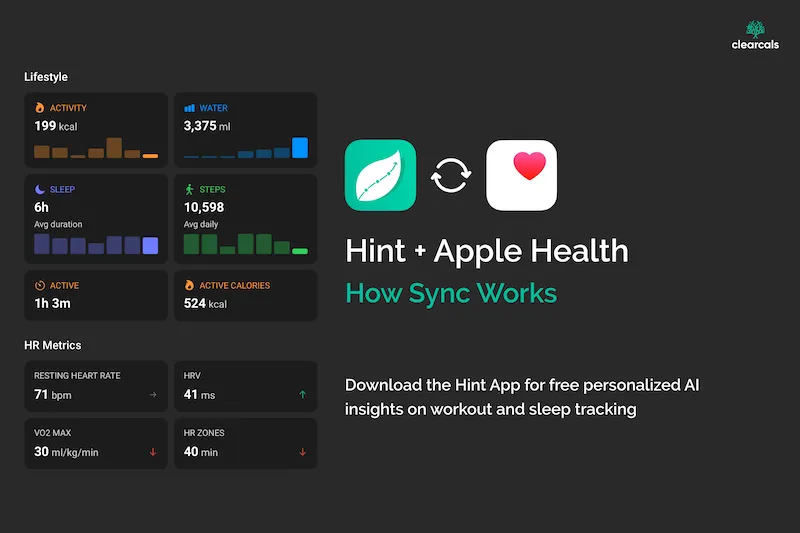
Hint and Apple Health: How Automatic Workout & Sleep Sync Works (2026)
By Dr. Krishna Athmakuri, Co-Founder & CEO, Clearcals | Updated: August, 2026
TL;DR
- On iOS, Hint syncs automatically with Apple Health — workouts and sleep flow in with no manual entry
- This is a direct integration: Hint ↔ Apple Health
- A Garmin watch does not sync to Hint directly — it syncs to Garmin Connect, and Garmin Connect needs to be linked to Apple Health for that data to reach Hint
- An Apple Watch syncs to Apple Health directly, which then flows into Hint the same way
- Android users: Hint now syncs the same way via Google Health Connect — live as of August 2026
Table of Contents
- What Syncs Automatically
- How the Sync Path Actually Works
- Garmin Watches: the Correct Sync Path
- Apple Watch: the Correct Sync Path
- Setup
- Android Users
- FAQs
What Syncs Automatically
Once connected, Hint pulls workouts and sleep data from Apple Health with no manual logging required — any activity already recorded in Apple Health, from any source, appears in Hint automatically. Each synced workout and sleep entry also gets its own free AI insight, personalised to your goal the same way meal insights are — for example, flagging that a walk exceeded your activity target, or that a short night's sleep is worth factoring into recovery.
How the Sync Path Actually Works
This is the part worth being precise about, since it's easy to get wrong: Hint integrates directly with Apple Health, and only Apple Health. It does not have a direct integration with Garmin Connect, Fitbit, or other fitness platforms. If a device or app can get its data into Apple Health, that data reaches Hint. If it can't, it doesn't.
Garmin Watches: the Correct Sync Path
A Garmin watch does not sync to Hint directly. The actual path is:
Garmin watch → Garmin Connect app → Apple Health → Hint
For this to work, Garmin Connect needs to be set up to share data with Apple Health (a setting inside the Garmin Connect app on iOS). Once that link is in place, workouts recorded on the Garmin watch flow into Apple Health, and from there into Hint — with no manual logging at any step. But the connection to Hint is always via Apple Health, never a direct Garmin Connect integration.
Clearcals bundles this: purchase a Garmin watch from the Clearcals Store and get 1 month of Hint Premium free (worth ₹1,999).
Apple Watch: the Correct Sync Path
An Apple Watch is simpler, since it writes to Apple Health natively:
Apple Watch → Apple Health → Hint
Any workout recorded on the watch appears in Hint automatically, no intermediate app required.
Clearcals also bundles this: purchase an Apple Watch from the Clearcals Store and get a free Hint Pro subscription.
Setup
- On your iPhone, go to Settings and grant Hint permission to read workout and sleep data from Apple Health
- If you're syncing from a Garmin watch, open the Garmin Connect app and confirm it's set to share data with Apple Health
- Log a workout (or wait for your watch to record one) and check that it appears in Hint without manual entry
Android Users
Apple Health is an iOS-only platform, so this specific integration doesn't apply to Android. Hint now syncs Android workouts and sleep the same way via Google Health Connect — the exact same pattern described above, just on the Android-equivalent data hub. See our dedicated Google Health Connect guide → for setup steps and the Garmin sync path on Android.
Frequently Asked Questions
Does Hint sync directly with Garmin Connect? No. Hint only integrates directly with Apple Health. Garmin data reaches Hint indirectly — Garmin Connect must be linked to Apple Health first.
Do I need an Apple Watch for this to work? No. Any device or app that writes to Apple Health can feed data into Hint, including a Garmin watch (via Garmin Connect) or other fitness apps that support Apple Health.
Is Apple Health sync free? Yes — it's available on the free tier, along with the rest of Hint's core tracking features.
Do synced workouts and sleep get AI insights too? Yes — once a workout or sleep entry syncs in from Apple Health, Hint generates a personalised AI insight for it, tied to your goal, the same way it does for meals.
Does this work on Android? Not via Apple Health, since that's an iOS-only platform. Android uses Google Health Connect sync instead — the same pattern, live as of August 2026.
What if my Garmin workouts aren't showing up in Hint? Check that Garmin Connect is set to share data with Apple Health first — this is the step most commonly missed, since it's a setting inside Garmin Connect, not inside Hint.
Read Next
- Hint and Google Health Connect: How Sync Works on Android →
- Hint – An Indian Food Calorie Calculator & More →
- How Hint's Free AI Insights Work →
- Best Garmin Watches in India →
- Hint Premium →
About the Author
Dr. Krishna Athmakuri is the Co-Founder and CEO of Clearcals, where he leads the development of data-driven health technology for India. With a Ph.D. in Chemical Engineering from Rensselaer Polytechnic Institute, New York, his expertise spans protein analytics, bioprocess engineering, and health data systems. At Clearcals, he applies that scientific rigour to build personalised fitness tools — including the Hint app — grounded in Indian nutritional science and clinical evidence.
Connect with Dr. Krishna on LinkedIn