Track your nutrition and health goals

10 Tips for Accurate Calorie Tracking | Clearcals
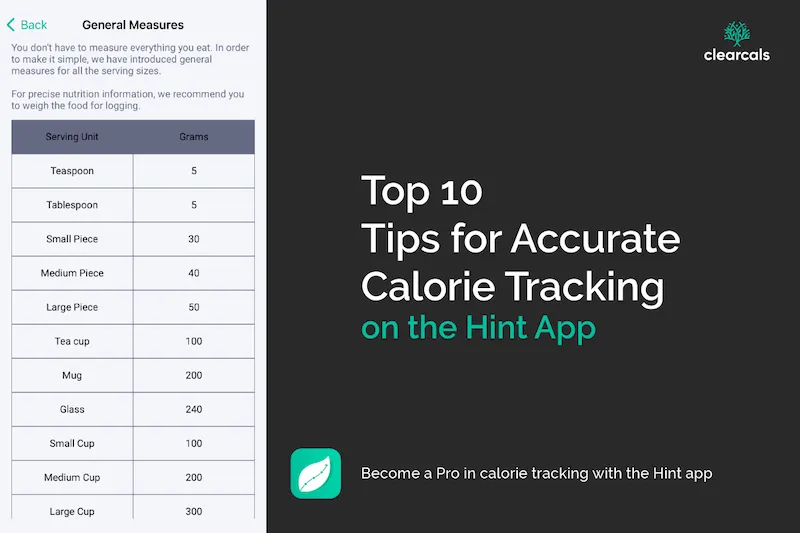
Top 10 Tips for Accurate Calorie Tracking on the Hint App (2026)
By Dr. Krishna Athmakuri, Co-Founder & CEO, Clearcals | Updated: August, 2026
TL;DR
- Most tracking inaccuracy comes from a handful of repeatable mistakes, not random error
- Cooking oil/ghee and eyeballed portions are the two biggest sources of underestimation
- These ten fixes apply whether you're using Hint or any other tracker — but Hint's custom recipe builder and verified Indian recipes remove several of them by default
Accurate tracking isn't about logging perfectly — it's about avoiding the handful of mistakes that quietly undercount your actual intake. Here are the ten that matter most.
1. Log Cooking Oil and Ghee Every Time
A tablespoon of ghee adds roughly 135 kcal and is nearly invisible once mixed into a dish — the single biggest blind spot in Indian home cooking, whether you're tracking manually or with an app.
2. Use Your Recipe, Not a Generic Entry
For homemade dishes, a generic "dal" or "sabzi" entry can be off by 30–50% depending on how much oil and ghee you actually used. Use Hint's custom recipe builder — "Create Your Recipe" — to log your actual ingredients once, then reuse it accurately every time.
3. Weigh Portions for at Least a Week
Eyeballing a "katori" can mean anywhere from 100g to 180g depending on the bowl. A kitchen scale for a week calibrates your eye far faster than months of guessing.
4. Use Recents and Favourites for Repeat Meals
If you eat the same breakfast most days, save it to your favourites — this removes the friction that causes people to skip logging altogether.
5. Be Honest, Especially on Bad Days
Skipping the log on an over-target day defeats the purpose of tracking. The days you go over are exactly the data you need to spot patterns.
6. Log Immediately, Not at the End of the Day
Logging right after eating catches items you'd otherwise forget by evening, and lets you adjust the rest of the day in real time if you're already close to target.
7. Track Your Workouts, Not Just Your Food
Calorie burn from exercise is the other half of the equation. Hint lets you log workouts — including 300+ strength and gym workouts, free on every plan — without needing a wearable, so your expenditure side is as accurate as your intake side. If you do use a smartwatch, Hint can pull workouts and sleep in automatically instead: an Apple Watch syncs directly via Apple Health on iOS, and on Android, Google Health Connect does the same job. A Garmin watch reaches Hint through one of those two hubs rather than a direct Garmin integration.
8. Watch Macros, Not Just the Calorie Total
Two days with identical calorie totals can have very different protein, fat, and carb splits — and that split affects hunger, muscle retention, and how you feel. Hint's meal summary breaks this down automatically.
9. Check Micronutrients Periodically
Calorie tracking alone can miss gaps in vitamins and minerals. Hint's diet summary tracks 12 vitamins and 9 minerals against Indian RDAs — worth a glance weekly, not just daily.
10. Review Weekly, Not Just Daily
A single day tells you little. Reviewing your week — via Hint Pro's weekly and monthly trend views — shows which specific days tend to break your consistency, so you can plan around the pattern instead of relying on willpower.
Frequently Asked Questions
What's the single biggest calorie-tracking mistake people make? Not logging cooking oil and ghee. It's calorie-dense (9 kcal/gram), nearly invisible once mixed into a dish, and the most consistently underestimated ingredient in Indian home cooking.
How can I track homemade Indian food accurately? Use a recipe-builder feature to log your actual recipe — including real oil/ghee quantities — once, then reuse it. Generic database entries for common dishes vary too widely to be reliable on their own.
Do I need a smartwatch to track workouts accurately? No. Hint estimates calorie burn from your profile and logged workout type/intensity without requiring a wearable. If you do have a smartwatch, Hint can sync automatically instead: an Apple Watch connects directly through Apple Health on iOS, and Google Health Connect does the same job on Android. A Garmin watch doesn't sync to Hint directly on either platform — it goes through Garmin Connect, which needs to be linked to Apple Health or Google Health Connect first. See our full breakdowns of how Apple Health sync and Google Health Connect sync work for the exact setup steps.
Read Next
- Introduction to Calorie Tracking: Getting Started with the Hint App →
- Custom Recipes on Hint: Build or Clone Any Recipe →
- Hint and Apple Health: How Sync Works →
- Hint and Google Health Connect: How Sync Works on Android →
- How Accurate Are AI Calorie Tracking Apps? →
- Hint – An Indian Food Calorie Calculator & More →
About the Author
Dr. Krishna Athmakuri is the Co-Founder and CEO of Clearcals, where he leads the development of data-driven health technology for India. With a Ph.D. in Chemical Engineering from Rensselaer Polytechnic Institute, New York, his expertise spans protein analytics, bioprocess engineering, and health data systems. At Clearcals, he applies that scientific rigour to build personalised fitness tools — including the Hint app — grounded in Indian nutritional science and clinical evidence.
Connect with Dr. Krishna on LinkedIn